Orderbook#
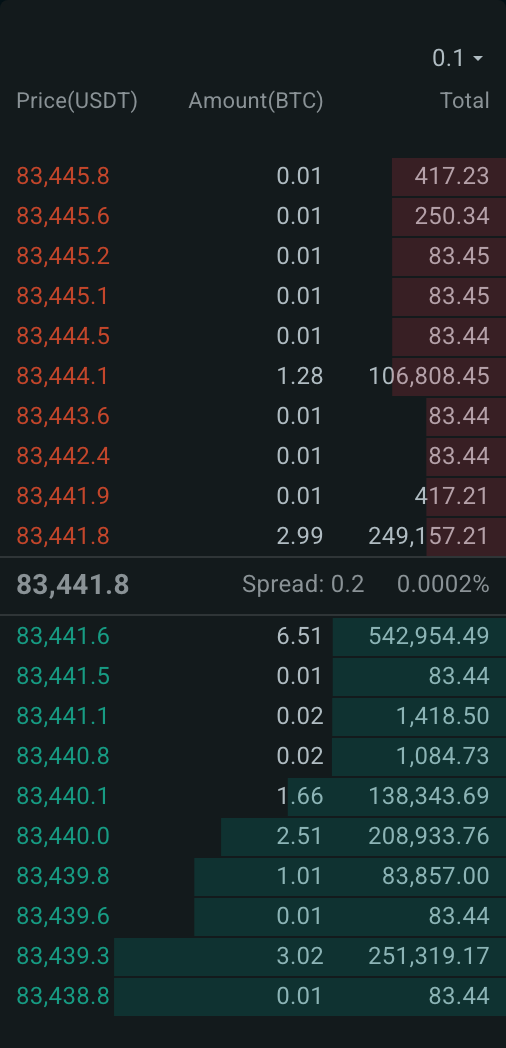
The Orderbook shows all bids and asks currently active in the market, continuously tracking real-time fluctuations in market prices and the size of each bid and ask.
It also shows the spread for each asset pair at any given moment, updated in real time. This is valuable for assessing potential spread savings when you choose to execute passively with Anboto's intelligent strategies.
You can have up to 4 orderbooks on the page. Each follows the symbol of its group; change it from the symbol selector in the widget header.
What it shows#
- Columns Price (in the quote currency), Amount (in the base coin) and Total.
- Between asks and bids, the mid price with an arrow for its last move, and the Spread as a price and a percentage.
Price grouping#
The grouping menu at the top of the widget sets the price step the levels are grouped by. Pick a larger step to see the depth over a wider price range.
Hover for depth and impact#
Hover a level to see what it would take to trade down to that price: the cumulative amount in the base coin and in the quote currency, the Avg.Price you would get, and the Price Impact in basis points against the mid price.
Click to set a limit price#
When the order form of the same group is on Limit, clicking a level copies its price into the Limit price field.